The personal health and financial information stored in thousands of North American home computers may be vulnerable to theft through file-sharing software, according to a research study published online in the Journal of the American Medical Informatics Association.
Healthcare professionals who take patient information home to personal computers containing peer-to-peer file-sharing software are jeopardizing patient confidentiality, note the authors of the study.
"Computer users may be unaware that sensitive information in their personal files on their personal computers can be exposed to other users, because some vendors use software containing dangerous sharing features," says Prof. Khaled El Emam, Canada Research Chair in Electronic Health Information and lead author of the study.
El Emam's CHEO team used popular file sharing software to gain access to documents they downloaded from a representative sample of IP addresses. They were able to access the personal and identifying health and financial information of individuals in Canada and the United States. The research for the study was approved by the CHEO ethics board.
The study is the first of its kind to empirically estimate the extent to which personal health information is disclosed through file-sharing applications.
North Americans use file-sharing software such as Limewire, BitTorrent and Kazaa primarily to share and access music, videos, and pornography.
During their research on this project, El Emam said he and his colleagues found evidence of outsiders actively searching for files that contain private health and financial data. "There is no obvious innocent reason why anyone would be looking for this kind of information," stated El Emam. "Very simple search terms were quite effective in returning sensitive documents."
Most Canadians would be better off not using file-sharing tools if they want to protect their sensitive information. "Trying to use the programs' own privacy safeguards requires considerable information technology expertise," add Dr. El Emam.
Only a small proportion of the IP addresses the researchers examined contained personal health information, but since tens of millions of people use peer-to-peer file sharing applications in North America, that percentage translates into tens of thousands of computers.
The security of financial information has gained more public attention, and researchers did find that a higher percentage of downloaded files contained personal financial information. But as the United States and Canada move towards more digitization of health records, ensuring the privacy of health information is becoming a hot button issue.
A sample of the private health information the CHEO team was able to find by entering simple search terms in file-sharing software:
* an authorization for medical care document that listed an individual's Ontario Health Insurance card number, birth date, phone number and details of other insurance plans;
* a teenage girl's medical authorization that included family name, phone numbers, date of birth, social security number and medical history, including current medications;
* several documents created by individuals listing all their bank details, including account and PIN numbers, passwords and credit card numbers.
The study, financed by the Canada Research Chairs program, includes recommendations for managing risks when using file-sharing software.
FOR MORE , VISIT HERE: WWW.FREEINTERNETTRICK.CO.CC
Friday, March 19, 2010

Wednesday, March 17, 2010
Free PC Tools Internet Security 2009 License Key For One Year
Few months back we had posted about Free PC Tools Internet Security 2009 promotion program.Today we share another promotion program by PC Tools.For those who missed the earlier PC Tools promotion program , this is a golden chance to get free one year license key PC Tools Internet Security 2009 .Normally PC Tools Internet Security 2009 License Key for one year cost $59.95 but you can get absolutely free for one year by following this simple steps.

Here we go
- Go to http://www.stealthy.us a proxy website
- Enter this promotion page URL to( http://www.pctools.com/internet-security/free/promo/PCUSER2009 ) and click Take me there
- Just filling the form with a working email-id as your License Key will be sent to that email-id
- Enter the Promotion Code as DGH8R5
- Check your email for a mail from PC Tool that contain your PC Tool License Key and Name with the subject Free Internet Security License
- Download and install the latest version of PC Tools Internet Security 2009
- Run and Register PC Tools Internet Security 2009 with the name and License Key in the mail

Free McAfee Internet Security for 6 Months
McAfee is giving out a 6 month trial for the UK citizens. but all others other than UK citizens can avail this trial.This license is valid for 3 users.

1.Go to here and click ‘Try now’ 6 month trial.
2.Click ‘Register Now’ if you are new user.Plz Register an account using your valid email. Activation link will be send to your inbox click and activate your account.
3.Then you click the ‘Download’ icon and start downloading McAfee Internet Security.
The McAfee Internet Security will have a trail period of 6 months.
FOR MORE , VISIT HERE: WWW.FREEINTERNETTRICK.CO.CCFree Kaspersky Antivirus 2010 for 180Days
 For all those kaspersky fans who always missout the promotional offers of Kaspersky here is the latest promotional offer by which you can get free license key for 180days.
Again this program is for MSN users of china but you guys can also get a valid 180 days license key all you need is a MSN account, if you dont have plz create a new one its easy.
Steps
1) First go this promotion page.
2) Click the large orange button.

3)Login using your MSN username and password.

4) That’s it you just got a 180 day valid license key.


FOR MORE , VISIT HERE: WWW.FREEINTERNETTRICK.CO.CC
Friday, March 12, 2010
How to Block Porn on your Computer without Software
Unwanted images can crop up on your computer even with routine searches. To block pornographic material, many families have turned to software-based solutions. Software is expensive, requires updating and can be altered by computer-savvy children. Block porn and other harmful material from appearing on your PC and your home network by filtering all incoming Internet traffic before it reaches a computer.
Instructions
Instructions
- Step 1
Sign up for an account at opendns.com. DNS is a service that translates alphabetic web addresses into the numeric IP addresses your computer needs to connect to a website on another computer or server. Most ISPs (Internet Service Providers) designate a DNS service, but you can choose any service you want.
- Step 2
If you don't have a router, go into your control panel on your Windows XP system and click on network connections. Select your connection and click on properties and then on Internet protocol (TCP/IP). Click on properties and select the radio button marked use the following DNS server address. In the preferred DNS server box put 208.67.222.222 and in the alternate DNS server box put 208.67.220.220 and press OK when you are finished.
- Step 3
If you have a router, it is best to set the DNS settings on your router rather than on a computer. Routers filter the traffic before getting to your computer, which increases security. It also allows you to change settings one time, rather than on each computer on your network. Find the DNS preferences on your router and change them to 208.67.222.222 and 208.67.220.220 and save. You may need to reboot your router for the settings to update. Specific instructions for your router can be found on opendns.com.
- Step 4
Select filter settings. Sign into your account on opendns.com and click on the settings section. Choose your desired level of filtering. To block porn and phishing (websites that attempt to gain your information through deception), select low. If you want to block pornography, phishing, adult sites and illegal activity, select moderate filtering. If you prefer to block all porn, illegal activities, video sites, social networking and time wasting websites, select high filtering. After selecting the radio button next to your desired filtering level, click apply.
- Step 5
Block specific websites. If you have a specific website you always want to block, add it under manage individual domains. After you add the domain name to block, click add domain.
- Step 6
Check settings. Wait two hours for your filtering and website blocking settings to be updated on opendns servers. After two hours, search for websites that should be blocked. You can search for general porn by putting free porn in a Google search and selecting one of the search results. If your settings are working properly, you should see a website that says: site blocked [website address] is not allowed on this network.
OpenDNS Launches Free Porn Filter
OpenDNS, a innovative startup that uses the domain name lookup architecture to fix misspellings and block attempts to surf phishing sites, now lets home users and IT administrators alike to block access to adult-oriented sites, using a long list of verboten URLs provided by St. Bernard’s human-edited database iGuard.
OpenDNS, which THREAT LEVEL highly recommends, is a free replacement to domain name service usually provided by ISPs. DNS is essentially a constantly changing phone book for the internet. When you want to surf to wired.com, your computer asks a DNS server to translate the name of the site into the numeric IP address where the site currently lives. OpenDNS is attempting to add intelligence to this service by removing confirmed phishing sites from the database, letting users choose to have craigslist.cm automatically changed to craigslist.com to prevent domain squatting, and providing a keyword browsing service that works on multiple computers.
Now users can also choose to block adult content, from tasteless sites to hardcore pornography, by signing onto a new service. It’s easiest to use for large networks or individuals with a static IP address. Those who have a dynamic IP address (most common with dial-up or lower tier broadband connections) need to jump through an extra hoop by installing a program that reports your computer’s current address to OpenDNS. It’s relatively straightforward, though OpenDNS could do a better job of providing instructions.
Even if you aren’t interested in a free internet filter, you may well find that OpenDNS can keep you online when everyone else is timing out.
FOR MORE , VISIT HERE: WWW.FREEINTERNETTRICK.CO.CCMonday, March 8, 2010
FreeCall: Make free local and mobile calls trick
Free calls are just a minute away
During this time of financial crisis you must have wondered if there was a way to make free calls so that you can reduce your cost of living a bit.Well we at cshared.com brings you with a new and cost free way of making calls to both local and mobile phones all over the world.Yep you heard it right and its totally FREE.
This program is called FreeCall.
Vist FreeCall to see whether your country is listed (almost all countries are listed there 
The best part is yet to come.We at cshared are going to exclusively announce the trick that you can implement to make the program give you more free calls.
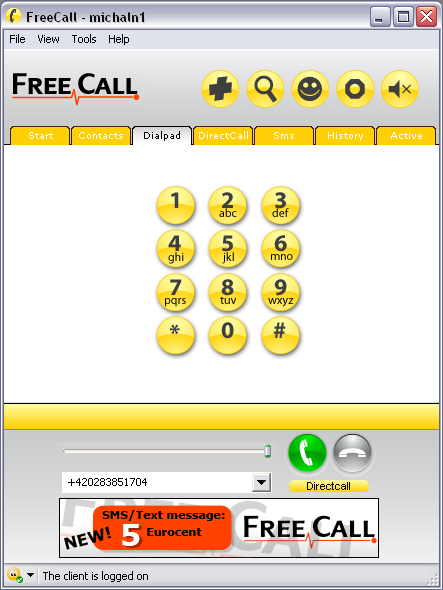

THE TRICK: “FreeCall is still a Freeware app but you only get 300 minutes a week. To bypass this restriction: Keep the setup.exe. Freecall’s protection system is quite flawed, when the program announces you cannot use any more minutes = Uninstall and reinstall and it will reset your 300 minutes which only takes a moment. A)You MUST make an account with the program when it loads up. Then when your logged in (it will say at the bottom: ‘The client is logged on’ Go to the dial pad TAB, ignore the on screen buttons, at the bottom type in your number and remember you need to add country codes at the beginning – NO spaces in the number either. C) And it does do all countries for free – i’ve used it from NZ to england, USA, Spain and Aussie and they used it back. D) If it didn’t work, you need to check your firewall settings etc, this is an obvious but a program like this needs full access.”
Download link:
FOR MORE , VISIT HERE: WWW.FREEINTERNETTRICK.CO.CC
Subscribe to:
Posts (Atom)