Although the spread of the virus via the Windows autorun techniques have started to decline, but this security hole we can not simply ignore. Some viruses are still using Autorun.inf in your USB stick as a trigger to make it easier to spread to different computers. If before I ever discuss Vaccine USB Panda, now there is another alternative, namely USB Defender.
USB vaccination technique has actually been more than one year are used by various security software. Including local antivirus like SmadAV also use this technique. This technique by creating a file or folder with the name of Autorun.inf in protection so it can not be deleted, in the renamed or changed. In this way, the virus that will create the autorun.inf file and will not be able to spread to other computers.
Keep in mind that such vaccination is only to prevent the spread through autorun.inf only and will not prevent infected USB stick. So the flash can still be exposed to viruses, just not going to spread to other computers automatically.
USB Defender
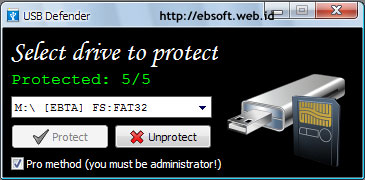
USB Defender was developed with such techniques, which will create a folder Autorun.inf in protection with five levels. Its use is very easy, we just choose the drive USB Flash drive that will be on protection, and then click the Protect button.
In order to use five levels of protection, Pro menu method must be enabled (checked). And to do this, the computer user must have administrator privileges.
The proposed technique uses a USB defender is indeed quite powerful. Like the Vaccine USB Panda, this protection technique can not be deleted with Unlocker software (SmadAV protection can still be deleted with Unlocker). But if the "Pro Method" is not selected, only four levels of protection (4 / 5) and autorun.inf can still be removed with Unlocker. Therefore, make sure the pro-protection method is selected when the USB stick.
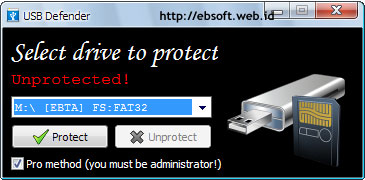
If we previously had on the flash protection with USB Panda Vaccine, the protection we can still replace them with protection from a USB Defender which prevent the spread of the virus via the Windows autorun.
Besides the character of portable (no need to install), USB Defender also supports all Windows system files (FAT or NTFS). According to its maker, USB Defender is also more powerful than USB Panda Security and Threat USB Defender.
Download USB Defender (~ 350 KB)
Source : http://ebsoft.web.id/
Thursday, July 15, 2010
Saturday, July 10, 2010
Secured Tips for Online Shopping via Internet
But in addition to offering online shopping gains also are at risk because we know that Internet is a fertile land for deceptive practices, deceptive because the buyer and the seller does not meet directly. how we get around it in order not to be trapped inside due to shop online scams in Internet. Here are some tips:
1. Do advance research and observation of the site as the place we're going shopping. Check whether the seller is to include a contact who can be contacted e.g telephone, YM, address or have an account at social networking sites like facebook. If things like this do not exist or could not be reached then the site does not deserve to be the place to shop.
2. Do not easily give personal data such as identity card numbers, driver's license, ATM card or personal account to the seller. Normally, personal information is rarely used in the buying and selling online.
3. Find and read information about the policy of those sites, or better known as the License and Agreement. Do not let the site has a policy may provide personal information to other parties. Read also about the purchase and return goods policy as this will be useful when we receive the goods unsuitable or defective.
4. Check prices listed on the goods, we should be suspicious if the same item has a price significantly different from that in the store.
5. Do not use the same password when transacting online because it is very risky against password theft crimes.
6. Provide a computer with an updated antivirus especially if the antivirus has spyware protection, anti-phishing and firewall better.
7. Asking for and preserve evidence if the transaction online shopping usually via email.
8. Better make payments in online transactions if we have a paypal accont. Because the payment via paypal will be guaranteed securely than using a credit card.
9. If you do not have a paypal account and forced TODD credit card, check whether the URL of the site whether the mark or the secure padlock. Usually the URL of the site such as this will automatically direct wage from http to https when going to conduct a transaction.
Latest Virus Reconnaissance Symbian OS
LONDON - NetQin a security company warned about the dangers of a new virus that attacks Symbian-based smart phones.
According to the company, the virus is difficult to detect because it disguised in mobile gaming. Some of the Symbian platform that became the target of the virus consists of a version of the S60 3rd Edition and S60 5th edition or the Symbian OS 9.4.
Quoted by SF Gate, Friday (7/9/2010), the virus was detected named ShadowSrv.A, FC.Downsis.A, BIT.N and MapPlug.A, this strain infect game in Symbian mobile phones. When the game is executed, the virus directly take over the mobile phone and tucked Malware.
"Once mastered, the virus will send a message to all contacts directly, and send messages to random phone numbers to connect to the server," wrote NetQin.
NetQin estimates there are 100 thousand mobile phones around the world are very susceptible to this virus. One of the key reasons are, the number of applications that flooded into smart phones in recent years.
Mode by inserting viral malware aimed at smartphone is not new. In late 2009, NetQin also never found a botnet named iKee capable of attacking the iPhone.
Source: Okezone
According to the company, the virus is difficult to detect because it disguised in mobile gaming. Some of the Symbian platform that became the target of the virus consists of a version of the S60 3rd Edition and S60 5th edition or the Symbian OS 9.4.
Quoted by SF Gate, Friday (7/9/2010), the virus was detected named ShadowSrv.A, FC.Downsis.A, BIT.N and MapPlug.A, this strain infect game in Symbian mobile phones. When the game is executed, the virus directly take over the mobile phone and tucked Malware.
"Once mastered, the virus will send a message to all contacts directly, and send messages to random phone numbers to connect to the server," wrote NetQin.
NetQin estimates there are 100 thousand mobile phones around the world are very susceptible to this virus. One of the key reasons are, the number of applications that flooded into smart phones in recent years.
Mode by inserting viral malware aimed at smartphone is not new. In late 2009, NetQin also never found a botnet named iKee capable of attacking the iPhone.
Source: Okezone
Saturday, July 3, 2010
Speed up Firefox browser with Speedyfox
Your Firefox browser slow? already using Tricks to accelerate Firefox but still felt less agile? Maybe you can try to speed up Mozilla Firefox Tools named Speedyfox. Mozilla Firefox Browser really fast, but as time goes by there will be many Fragmentation database that caused the slowing of Fire Fox.
Now, with this Speedyfox Software, Database fragmented will be compressed, so the automatic is lighter and faster loading Firefox. The advantage that you'll feel from Speedyfox are:
* Start Up Firefox 3 times faster
* Speed up Browsing History
* Operates faster with Cookies
Download Speedyfox - Software accelerator Mozilla Firefox
Speedyfox 1.4.2 (0.3 MB)
So what are you waiting? Speedyfox download immediately, accelerating Tools Mozilla Firefox. No need to worry, the program is very small, so it can download faster. Hopefully these posts useful
Now, with this Speedyfox Software, Database fragmented will be compressed, so the automatic is lighter and faster loading Firefox. The advantage that you'll feel from Speedyfox are:
* Start Up Firefox 3 times faster
* Speed up Browsing History
* Operates faster with Cookies
Download Speedyfox - Software accelerator Mozilla Firefox
Speedyfox 1.4.2 (0.3 MB)
So what are you waiting? Speedyfox download immediately, accelerating Tools Mozilla Firefox. No need to worry, the program is very small, so it can download faster. Hopefully these posts useful
Wednesday, June 30, 2010
Create a logo and image buton ONLINE
To create a logo we can use service sites on the Internet, that is cooltext.com, Please follow the following steps:
1. Please open http://cooltext.com address
2. Then click on a Logo Design
3. Click on the picture logo examples that you liked
4. Write the text you want in a logo made in writing beside Logo Text. Eg: Blog Tutorial
5. Write the desired size in the next paper Text Size. Example: 50
6. Click the logo colors besides the existing text box to select the color Text Color text (text). Please select a color pal who likes
7. Select the format of image file formats in addition to writing. should. JPG or. GIF
8. Click the button that reads Render Logo Design
9. Wait a few moments when the process of making a logo lasts
10. See the results of the logo, it fits or not? if not match, click on Edit this logo repeat the above step, change you wanted. If it matches, click on Download Image to our store on our PC
11. Done. You already have a logo.
1. Please open http://cooltext.com address
2. Then click on a Logo Design
3. Click on the picture logo examples that you liked
4. Write the text you want in a logo made in writing beside Logo Text. Eg: Blog Tutorial
5. Write the desired size in the next paper Text Size. Example: 50
6. Click the logo colors besides the existing text box to select the color Text Color text (text). Please select a color pal who likes
7. Select the format of image file formats in addition to writing. should. JPG or. GIF
8. Click the button that reads Render Logo Design
9. Wait a few moments when the process of making a logo lasts
10. See the results of the logo, it fits or not? if not match, click on Edit this logo repeat the above step, change you wanted. If it matches, click on Download Image to our store on our PC
11. Done. You already have a logo.
Search Engine Friendly for Joomla 1.5.x
What is the SEF? SEF stands for Search Engine Friendly, whose function is to maximize search engine indexing keyword in making it easier for search results close to the right keyword. In default, addresses a very long URLs in Joomla example: http://websiteku.com/index.php?option=com_content&view=article&id=5:joomla-license-guidelines&catid=25:the-project&Itemid=2.
It is now available several extensions to change the URL address into "friendly". There are several extensions that are used to set the display URL. For more details, please download at the official address of Joomla http://extensions.joomla.org/extensions/site-management/sef.
In the case study here, I am using Joomla! sh404SEF which is a security component and manages title and meta tags: automatic or manual tag for each page. This extension works with or without. Htaccess file. If you are using some component like Joomfish, sh404SEF is fully compatible. Caching system for high speed and very small DB queries overhead.
Support many components natively, using sef_ext from OpenSEF / SEF Advanced. VirtueMart, FireBoard, Community Builder, mosetsTree, HotProperty, Sobi2, Docman, myBlog, iJoomla Magazine, News Portal, Remository and more supported natively.
1. Okay, first download the file here sh404SEF (Download)
2. Once stored in the computer, go to the Administrator page and select the menu Extensions> Install / Uninstall.
3.Click the Browse button to select the files to be uploaded

4.Select the file and press Open button sh404SEF
5. Click the Upload File & Install for the installation process.
6. Wait a few minutes until the installation is complete.
7. Now arrange the URL configuration , click the Configuration sh404SEF.

8. Turn on the Main tab, then select Yes on the radio buttons.
9. Enable Tab By component, and set everything to use default handler.
10. When finished click Save button to save.
11. If a message appears, click the OK button.

12. Look at the result, URL addresses before using the SEF.
14. URLs Display after using the SEF.
It is now available several extensions to change the URL address into "friendly". There are several extensions that are used to set the display URL. For more details, please download at the official address of Joomla http://extensions.joomla.org/extensions/site-management/sef.
In the case study here, I am using Joomla! sh404SEF which is a security component and manages title and meta tags: automatic or manual tag for each page. This extension works with or without. Htaccess file. If you are using some component like Joomfish, sh404SEF is fully compatible. Caching system for high speed and very small DB queries overhead.
Support many components natively, using sef_ext from OpenSEF / SEF Advanced. VirtueMart, FireBoard, Community Builder, mosetsTree, HotProperty, Sobi2, Docman, myBlog, iJoomla Magazine, News Portal, Remository and more supported natively.
1. Okay, first download the file here sh404SEF (Download)
2. Once stored in the computer, go to the Administrator page and select the menu Extensions> Install / Uninstall.
3.Click the Browse button to select the files to be uploaded
4.Select the file and press Open button sh404SEF
5. Click the Upload File & Install for the installation process.
6. Wait a few minutes until the installation is complete.
7. Now arrange the URL configuration , click the Configuration sh404SEF.
8. Turn on the Main tab, then select Yes on the radio buttons.
9. Enable Tab By component, and set everything to use default handler.
10. When finished click Save button to save.
11. If a message appears, click the OK button.
12. Look at the result, URL addresses before using the SEF.
14. URLs Display after using the SEF.
Tuesday, June 22, 2010
Powerful tips to increase google Pagerank
Having a blog with high pagerank that are obviously very profitable for online business. As a business paid to review, one of the factors leading to our blog to get an order to review is the value of PageRank of our blog. Similarly, the business sale and purchase links. The higher the PageRank value of our blog the greater the willingness of other parties to put the link on the blog.
But to get high pagerank was not easy. Required minimum of three months in accordance with the schedule update google pagerank status or level of popularity of our blog pages. Then how our efforts to improve our blog pagerank?
Here are 12 tips that quoted from various sources to increase the pagerank blog:
1. Make sure you include at least one link to Google
2. Use a lot of meta keywords tag. Use them with commas. Make sure you do not repeat the same word more than three consecutive times in a row. Google only index the first 101K of documents, so do not be too much.
3. Write a lot of dots, dots and dots. Then place it in the bottom of a document like this:
... ... ... ....
Then make a link from each of these points into your blog pages. Make sure there is a link to Google. Do not link to other sites (besides your own blog itself).
4. The fourth tip is probably one of the most powerful tip. Make at least three-page / pages / posts on your site link and make the scheme as follows:
Page 1 link to Page 2
Page 2 link to Page 3
And this is a kick behind it:
Page 3 linking back to Page 1
Google will give points to page 2 from page one, then points 3 pages of page two, and then if you link back to page one then google will repeat it again from scratch. This method is also often called interlinking or linking to each other between the one-page / post to another page.
5. Use H1 tags throughout your blog page except the title and information in the header. Css settings to use the written form H1 is not too large. Remember that google is very concerned that papers are in h1 tags.
6. Update content more quickly and more.
7. Backlinks on blogs that have also been linking to your blog page.
8. Be careful in writing content that contains words that could lead to biased google that your site is banned sites such as sites abused sites and so forth.
9. Update your blog content articles every day with a different and unique. When visitors get valuable information from your blog, then chances are 100% he will be back to visit your blog.
10. Provide links that point to various pages / other articles in your blog, such as related articles. This will make visitors stay longer in your blog.
11. Create a sitemap for your website (XML based for text-based Google and yahoo) and then submit a sitemap to Google and Yahoo. Make a Google webmaster account and sign up there to see your website statistics. This will tell you whether your site is indexed or not.
12. And the most important tips is to exchange your blog links with other blog owners. This method is very fast way to increase your visibility in search engines.
Finally, hopefully useful tips for you. Regards.
But to get high pagerank was not easy. Required minimum of three months in accordance with the schedule update google pagerank status or level of popularity of our blog pages. Then how our efforts to improve our blog pagerank?
Here are 12 tips that quoted from various sources to increase the pagerank blog:
1. Make sure you include at least one link to Google
2. Use a lot of meta keywords tag. Use them with commas. Make sure you do not repeat the same word more than three consecutive times in a row. Google only index the first 101K of documents, so do not be too much.
3. Write a lot of dots, dots and dots. Then place it in the bottom of a document like this:
... ... ... ....
Then make a link from each of these points into your blog pages. Make sure there is a link to Google. Do not link to other sites (besides your own blog itself).
4. The fourth tip is probably one of the most powerful tip. Make at least three-page / pages / posts on your site link and make the scheme as follows:
Page 1 link to Page 2
Page 2 link to Page 3
And this is a kick behind it:
Page 3 linking back to Page 1
Google will give points to page 2 from page one, then points 3 pages of page two, and then if you link back to page one then google will repeat it again from scratch. This method is also often called interlinking or linking to each other between the one-page / post to another page.
5. Use H1 tags throughout your blog page except the title and information in the header. Css settings to use the written form H1 is not too large. Remember that google is very concerned that papers are in h1 tags.
6. Update content more quickly and more.
7. Backlinks on blogs that have also been linking to your blog page.
8. Be careful in writing content that contains words that could lead to biased google that your site is banned sites such as sites abused sites and so forth.
9. Update your blog content articles every day with a different and unique. When visitors get valuable information from your blog, then chances are 100% he will be back to visit your blog.
10. Provide links that point to various pages / other articles in your blog, such as related articles. This will make visitors stay longer in your blog.
11. Create a sitemap for your website (XML based for text-based Google and yahoo) and then submit a sitemap to Google and Yahoo. Make a Google webmaster account and sign up there to see your website statistics. This will tell you whether your site is indexed or not.
12. And the most important tips is to exchange your blog links with other blog owners. This method is very fast way to increase your visibility in search engines.
Finally, hopefully useful tips for you. Regards.
Subscribe to:
Posts (Atom)