Tuesday, October 19, 2010

Setting Wordpress Permalink For SEO Friendly

How do I change settings / wordpress blog permalink structure to make it more SEO friendly and free of problems. In WordPress, the default permalink setting is /? P = 123, so the url to display is http://www.yourdomain.com/?p=123. of course this is not SEO friendly because the post title is not displayed on the url. Such as learning on-page SEO, we know that appearance on permalink post title will help the SERPs (Search Engine Result Pages). Should be changed permalink structure to /% category% /% postname% or even just /% postname% only. so that the url blog post will appear http://www.yourdomain.com/categori/postname or http: / / www.yourdomain.com /postname only.


In the new WordPress Blog, of course, this does not matter. changes can be done easily and not at risk. But what about the blogs already a lot of content? this remains a problem because the blog will lose backlinks that have been built with great difficulty due to changes in the permalink structure. Now on wordpress tutorial this time I will give simple tips and tricks wordpress to resolve the issue using the redirect trick. Htaccess file ..

Steps:

First reply you have to do is log into the wordpress admin panel. In your wordpress dashboard, click Settings> Permalinks. Then select Custom and then fill it with /% category% /% postname% or /% postname% only, as shown below ..


after that, your permalink structure will look like this http://yourdomain.com /postname

Now we need to redirect all the backlinks that use the old permalink structure to the new permalink structure. To do this you have to edit. Htaccess file located in the root directory on your wordpress hosting, Be careful when going to edit. Htaccess file, make sure you backup these files first.

Download and open the file. Htaccess file editor with a kind of notepad or WordPad, then add the code lines below:

RedirectMatch 301 / ([0-9 ]+)/([ ]+)/([ 0-9 0-9 ]+)/(.*)$ http://www.domain.com/ $ 4

Then save your changes and upload again on the root directory of your wordpress. Done, you just change settings on your wordpress permalink structure without losing backlinks

Monday, October 18, 2010

Save Laptop battery life with software


In the past, I've shared about some tips to save laptop battery without using the software, this time I will share how to save battery life by using software called LocalCooling. How will I share it below is definitely easier and more efficient (time) to do this at the following steps:

1. Download software LocalCooling HERE. Do not worry, it's freeware (3.91 MB)

2. Install

3. Then run LocalCooling. Click Settings at the bottom right.

4. There are 4 tabs. For the former, namely the General tabs. Buddy can choose the power saver is used. Namely, the laptop shutdown automatically after some time, shutdown screens, etc.. (See for yourself is: p)

5. For other settings, you can own person who tinkers yaa .. Instead of nothing .. I try to take a screenshot, but when I shoot, window LocalCoolingnya missing (shame time yes?!!).

After using this software on my laptop, feels very different than before. After the use of a laptop that has more than 1 hour, not to feel hot on my laptop (usually just 45 minutes already starting to feel the heat)

If you don't believe, please try it!

If there is still confused, please enter in the comment section.

How to import MP3 songs and Playlists from ipod, iphone and ipad

if you lose all songs and playlists (available on the iPod) might be due to hard disk crashes or corrupted, you can easily retrieve your list of songs or playlists from your iPod, iphone and ipad by using GizmoRip.


You can easily restore / import songs and playlists of music from your iPod, iPhone, iPod Touch, or IPAD to iTunes. You can copy tracks to your hard drive or just import the playlist directly to iTunes. GizmoRip supports the latest version of iTunes. GizmoRip supports all of Apple's music devices, including iPod, iPhone, iPad and iPod Touch

Sunday, October 17, 2010

How to increase the traffic by mutual exchange of traffic

How to increase the traffic can be done by mutual exchange of traffic or visits to increase traffic. Like the crazy tricks that have been discussed earlier , many of which raised objections if need blogwalking to 1000 blogs / day. Because it was deemed impossible and very time consuming. Well, blogwalking itself is a means to exchange visits among fellow bloggers, but not impossible if we do not everything will come back to visit. That's what it will be difficult to measure the effectiveness of our visit, so the traffic requests can not be ensured.

Well, traffic exchange itself is not only done with blogwalking only. However, traffic to increase traffic exchange visits can be done with the site traffic exchange services (see wikipedia: Traffic exchange) or a service traffic exchange sites. Well some sites traffic exchange service providers, among others:

1. zuminsurf.com
2. autosurfpro.com
3. xtreamsurf.com
4. autotrafficexchange.com
5. autotrafficteam.biz

To be able to enjoy this traffic exchange service, first register for free on these sites. Then how the workings of this traffic exchange system?!?

Simple it is each member will be given a job to do the surf to the address designated. Just click the address, we will immediately redirected to the URL address it and deemed to have made visits and traffic will be obtained. Every time we do click on the visit will get a visit back to 1:1 or 1:2 ratio depending on the policies of each site. So with one click which is actually less than 1 minute to be able to reach 1000 per day your blog or website is not the impossible again. So 1000 visitors per day was not a difficult thing.

So, 5-enhancing site of this automatic traffic can be an alternative to hunting traffic and increase it many times. And much easier to be able to do more professional blogwalking and efficient.

Saturday, October 16, 2010

All in One SEO plugin Optimization Tips for Wordpress


All in One SEO plugin has become mandatory for a jolly romp with SEOin Wordpress . Not many of them include other plugins that could boost the ability of the SEO blogs. At least have a lot of helpful tips that reviews the problem using this plugin, so that the optimization tips that I have provided even in the end has become public consumption of the master SEO.

Well, as usual in the initial setting all in one SEO plugin, the default value given is presented. Common default values are generally not replaced. However, to optimize this plugin, the default values should be replaced. The following explanation of the plugin description All in one SEO,:

1. Home title: The default value is empty, so this column is filled with something that lays on your homepage. Can the same with the blog title is in the general setting, can also more descriptive and contain many keywords that will be on optimization. What distinguishes between home title and blog title is the text that will appear at the top of all pages in your blog and addressed to visitors of your blog, while the home title is the title of a blog that only appear on the blog home page (home) and is intended for search engines. Tips: use more words that contain more specific keywords.

2. Home description: same as the default value that is empty home title, home discription describes the general description of your blog. And later will appear as the meta description on the homepage of your blog. Meta description used for the search engines and will be used if search engines did not find the main content of the relevant site pages. Tips: use the words that can invite visitors to visit your blog.

3. Format settings: by default the value of format is given, an example for the post title format:% post_title% |% blog_title% and other formats, but in general this default value can be changed as desired. Suppose that contains about Download Blog FIlm, can change the format into post Title: Download Free Movies% post_title%, or the like. Tips: Change the default values exist, the use of | will not be optimized plugin All in One SEO. And For the page title format can be added @yourdomain.com at the end of the word.

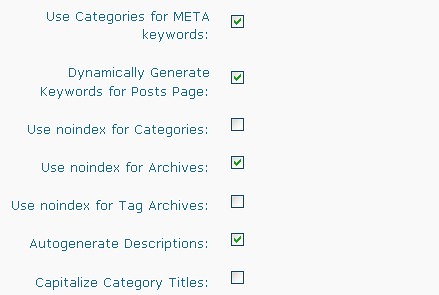
4. Indexing settings: the need to consider is the Use Categories for META keywords and Use noindex for. For the first function to insert meta keywords in your category, while the second one on the check when it wants not indexed to certain things, can archive, categories, and the tag archive. Thus, for the second, when the check then it will not be indexed. For Use noindex for archive and when indexed, it is not very useful search machined. Tips: the first is optional, especially for the Use noindex for archive should be in check only.

Maybe for the master SEO, optimization tips all in one SEO plugin is already done, so this just create a new study. So, here's tips for optimization all in one SEO plugin that is used to optimize on your blog page.

5 Tips for Keywords research

Keywords are vital in SEO. Error in determining keywords can result in visitors not abundant, and vice versa right keywords in the SEO will determine a significant impact in generating thousands of visitors every day. Need a specific strategy in determining the keywords in SEO. 5 tips to specify keywords in the SEO into things that must be taken into account in competition in the world of SEO. Here are 5 strategies in determining the precise keyword:

1. Do not focus on no.1 on google for keywords that will be used, but focus on ease of keywords in the interpreted and understood by the people and provoke a more curious titles. So long as still in page 1 of google, top google not a high priority, entered the Top 5 was no problem as long as the keywords used easy to understand, and with a title that more fishing curious.
2. Do not pleased at first with no.1 google with the keywords low level of popularity. So look for keywords that have a high level because the same search with the keyword if it is looking for a bit it will not be useful. Use the tools-tools google search in the search for a high level, can use google adwords.
3. Do not be fixated on single words in optimizing keywords. Even studies based on onestat.com say 33% is a combination of 2 words, 26% for the 3 combinations of 3 words, 21% for the combination of 4 words and new 1 word. This can happen because with a word results will appear very common, while many search engine users are looking for things that are more specific. And that is a fact of which the average search engine users will change the keyword to search for something more specific.
4. Seeing the competition keywords that exist, so do not just use keywords without seeing the rivalry that exists. Ideally, the fewer competitors are and the higher level of search. But if you can not find the ideal thing, use the average between the level of competition and the level of popularity.
5. Do not be too much in giving the keywords in each page. It would be boring for visitors and will give a negative assessment of the web. Moreover for google and other search engines will assume too much spam if the shoot keyword. So it should be balanced in the shoot keywords in a web page. strategy by providing a keyword for each paragraph, and more importantly is the first paragraph.

5 SEO strategy right in determining these keywords into things that are needed in accounting for SEO purposes. However, the above strategy may be not the right thing if the objective of SEO is not to solicit customers and visitors through search engines. As SEO contest, then the strategy is ranked 1 becomes the main objective, and any keywords not functional because keywords have been determined. So back again to the intended use of SEO on the website my friends.

6 Optimization tips to boost position in google

Optimization tips to boost position in google to be excellent for many website owners. No doubt because the current search engines become extraordinary tools to be able to get various kinds of information on the Internet. So the formula if you master the search engines then the control information on the Internet. Especially google, a giant company that still binds so strong dominance billion users on the Internet.

Of course a lot of tips that can be used to boost position in google. Of the many tips available, Backlink become a major force in the push up position on google. Did not rule, the more backlinks you have, search engines will increasingly believe in the web page.

Well, to be able to boost the google top 10, following 6 tips you can do:

1. If the engine wordpress, update service pinging services that are owned, how to see in my article about optimization ping.
2. Join dilayanan onlywire.com to be able to automatically submit to various directories automatically, a popular directory is digg, Mixx, stumbleupon, delicious.
3. If you want to promote something, spyonad.com suitable to be able to send all advertising materials to 200 providers classified ads website even more.
4. Submit to the various service providers such autosubmitter submitexpress.com, Scuttle, www.senuke.com, onepieceofmylife.com, cheap-Scuttle.
5. Install Plugins if booster SEO wordpress blog engine like: all-in-One SEO or SEO ultimate, WP Seo Tags, SEO Smart Link.
6. Blogwalking to a wide range of existing friends, or use tricks to crazy blogwalking .

Um, maybe 6 tips google top 10 levers will not work if you do not have good content. Finally it all back again to the content, content, and content to be able to get the top 10 in google.