Sunday, April 17, 2011

How to change START button text on windows XP

The start button located on the bottom left on the computer desktop. The start button is a button on a computer that is often used by the user. Start the name alone which means "start". So almost all activities of computer operations starts from the start button. Although there is no way quick button or shortcut key to open an application or program. Now associated with the start button, if shobat already saturated with the view, or want to look different from another computer, then we may modify the start button was mainly modifications or changes to the text or writings Start. Start writing on the Start menu can be converted into writing in accordance with our wishes. So will look more different and antique from another computer.

To make changes in winodws xp start writing, there are several steps that must be done, namely:

First step.
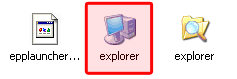
prepare umbrella before it rains. Because that will be in the hack is the explorer.exe file, so backup first explorer.exe file which is usually located at C: \ Windows by the way copy and paste it in a safe place.

Download and run the program resource hacker (541 kb). Can be downloaded at the link below.
http://re6vm.tk/

In resource hacker window click the file> open then locate the explorer.exe file usually located (C: \ Windows / explorer), click Open again
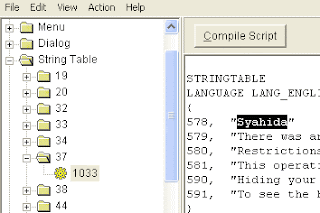
Expand the string table by clicking the + sign and then expand the number 37 and click on 1033
In the right panel look for writing 578, "start"
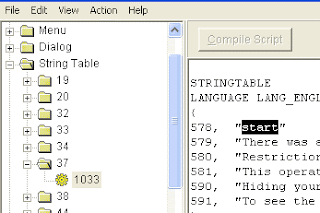

Change the start button as you like. This time we try to be replaced with the words Syahida
If so click the Compile Script button to make changes.

Click on a file and select "Save As" (do not select Save) and give file name as you wish. In this case I save with the name "Syahida" then click save.
Close the window resource hacker. Until this first step has been completed.

The second step
To run the explorer.exe file that has been changed to syahida.exe earlier then we have made ​​some changes to the registry editor.
Open the registry editor jendea
Go to HKEY_LOCAL_MACHINE \ SOFTWARE \ Microsoft \ Windows NT \ CurrentVersion \ Winlogon
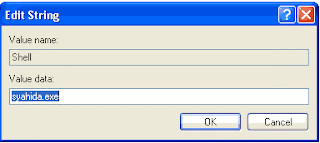
In the right panel look for key "Shell"
Change the value data from the explorer.exe shell had become syahida.exe (or the name of the file you have saved in the first step above)

If you have done the steps correctly, then start writing has turned into Syahida.



How to make CD-R can be used repeatedly to save data

Prior to launch the flash, one of the data storage media other than floppy disks is to use compact disc (CD). This CD has a surplus instead of a floppy disk. In addition to damage, this CD also has a capacity far greater than the diskette that is about 650-700 MB. Currently diskette is rarely used, even almost never. Compact disc (CD) There are two kinds of CDR (Compact Disc Recordable) which can only be used to store only and CDRW (Compact Disc Rewritable) can be used to store and also can delete files that have been stored and then to save the file / data again CDRW so that it can be used over and over again like a flash.

In contrast to the CDRW that can be charged and removed repeatedly, CDR can only be used to store only. When we save the data with a small volume to a CDR, then the CD can not be used to store data again. So that is very inefficient. We can get around for a CD R can be used to store data or files repeatedly, so it can be more economical and efficient. Programs that used to burn data to CD is a program Nero. For that trick for cdr can be used over and over this time using Nero program only.
  • As usual first open Nero program
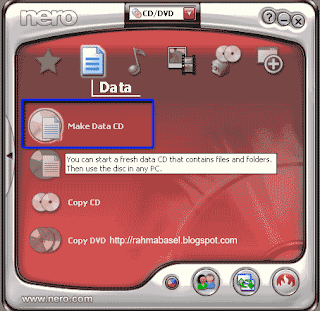
  • Select Data then click Make Data CD

  • Enter data or files that will burn to a CD by clicking the Add button and if it all clicks Next
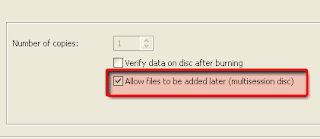
  • In the Final Burn Settings window switch or check the option Allow files to be added later (Multisession disc). By enabling this feature, the CD R shobat will be used to store other data at other times as well.
  • Click Burn.
Thus if there is still room on the CDR, then we can add data or files to a CDR, so can be more economical considering the price of the CDR is very much cheaper than the CDRW.

Sunday, April 10, 2011

How to avoid Cybercrime

Cybercrime is a threat that continues to grow, and cyber criminals slowly slipped to the sites that we believe. Each time you use the internet, know that: identity theft occurs every three seconds and you or your family may be just one click will become victims of cybercrime.

According to the report Norton Cybercrime Report 2010, 86 percent of Indonesian adult Internet users have become victims of cybercrime. This includes victims of the virus, online credit card fraud and identity theft. Unfortunately, people tend to underestimate the security of the website.

Although certain sites seem invisible harmless, behind it there may be hidden bugs or even viruses. Malicious Web sites can also contain phishing scams mode and unwary users can enter personal data in there, and then exploited by cyber criminals.Effects incident could even extend to the social circle of victims.

For example, someone who clicks on a malicious link or ad secretly download the software to their computer. Then, the software had to steal confidential information resulting in financial losses, or send spam messages to everyone in the person's contact list. Because the messages had been received from people they know, the first victim earlier contacts can be more easily persuaded to open it. And the circle of this attack continues.

Norton Cybercrime Report 2010 also found that it took 36 days to resolve cases of cybercrime. And it would cost more than Rp 11 million! (USD 11,558,945). That is why, a prevention efforts must already exist to protect the family. In order not to become one more victim of cybercrime.

Ensuring a comprehensive security software, such as Norton 360 version 5.0, will help maintain your safety while online. As a security solution all-in-one of the fastest and lightest in the industry today, Norton 360 v5.0 will protect your identity, computer and your important files. Comprehensive protection, easy to use and against almost all threats.

You can also use rating sites (website rating tools) such as Norton Safe Web to find out the security risks of a site before visiting. It's easy, just type the name of the site in safeweb.norton.com and get ratings. From the ratings it can be known, whether the site is secure from malicious threats and identity theft.

Solve the problem of cybercrime can be very frustrating and emotionally draining his victims. Users of online services should improve the knowledge and understanding of the digital dangers that continue to evolve to be able to avoid the pitfalls of cyber criminals.

Remember, every click is important, so clever was the clicking.And do not miss the information to protect themselves from cyber criminals out there.

Logitech Releases Keyboard Case for iPAD 2

Logitech's leading computer accessories company, did not want to miss a frenetic presence iPad 2. They released their first case fora tablet computer keyboards, the Logitech Keyboard Case.

At first glance, the shape of this accessory keyboards similar to thecase for the iPad Zaggmate first generation. Apparently Logitechis working with ZAGG in making his version of the iPad twogenerations.

Keyboard Case is made of aluminum with a variety of uses. Hecan work as a stand and wireless keyboard for iPad 2, either inlandscape or portrait mode.

Well when you're not in use, this device can be used as a protective wrap iPad 2. Claimed, this case strong enough to protect the iPad 2 of the clash and so forth.

Tag of the device that will soon be marketed starting in April isquite expensive, which is in the range of USD 100

Control Computer by blinking eyes

computer control only by blinking an eye? It may sound impossible,but with a special device it could have been done.

PCEye Tobii, a special gadget that is designed so that users canuse a computer in a different way. Shaped like a regular webcam,but must be placed at the bottom of the monitor and connected viaUSB.

After finally installed, then with a little calibration PCEye can be directly operated. Users only need to stare or blink to control the computer in front of him.

"Easy to use, reliable, and outstanding performance that our design goals for PCEye," said Oscar Werner, Executive VicePresident, Tobii Assistive Technology. As quoted fromTomshardware, Friday (8/4/2011).

Werner claimed PCEye also can recognize eye movements with an accuracy of about 95% without any unaffected by eye color, light conditions, the environment, even the motion of the head once.This device also said it will not burden the computer's performance.

"Tobii PCEye will not slow down the computer, because it hasinvested special prossor which ensures tracking eye movementdoes not drain PC resources," added Werner.

Monday, April 4, 2011

Tips of Choosing Women Bags according to the use

The Following are some Tips of Choosing Women Bags according to the use. To be cleverer in shopping bag organizer, here we share tips to know the woman's bag model and its usefulness.

Satchel
This handbag-sized large or medium, but the difference with the tote bag is on the grip handle short and small. Because of these, Satchel bag type can only be brought in by hand. Suitable for everyday activities and give the impression of feminine.

Messenger Bag
As the name implies, this bag similar to the model used by postmen to store the letters with which is strapped across the shoulder. Matches used to go to school or daily activities are more relaxed, because it can save a lot of luggage (depending on the size commonly found in the store bag). Messenger bags seem practical and are also widely used for men. The difference with men's messenger bag, messenger bag women usually have smaller sizes. Messenger bag is suitable for use with casual clothes like jeans, t shirts, and jackets.

Clutch
Clutch bags commonly known as hand luggage, do not have handles and are usually taken in a way grasped. Bags of this type are usually more suitable for formal events, such as when attending a party, but today many types of clutch bag that has a rather large size, so it can be used for everyday purposes.

Wristlets
This type is similar to a bag lady handbag small clutch size, yet has a handle shaped cuff and can be found in the store bag. This bag can be taken by way of hanging on the wrist. It is suitable for everyday activities that can serve as a wallet.

Tote Bag
This lady bag types are large and usually square-shaped. Personalized tote bag has a long handle , so it can be taken either way be brought in or carried on the shoulder. Tote bags are very suitable for use at work, traveling, or for their daily activities because it can save a lot of items such as books, clothing, wallets, and other purposes. Tote Bags designed by Stephen Joseph have good material quality. Stephen Joseph is one of creative person who have designed for any model of tote bag and also school kid backpack for your children.

How to motivate your child to go back to school

Parents will feel stress if you hate to hear her son to school and do not want school anymore. How to persuade him is not to scold or yell, but find out what the cause and invite your child speak carefully. Probably most of the children even feel hate to come to school, but usually those feelings do not last long. Schools are one place where someone could get an education, friends and develop the ability to socialize with others. Children who do not want the school could have been because the child feels scared or stressed out to come to school, this will affect to the body of the child.

There are several things you can do to motivate your child to be back to school:

1. Familiarize children to always write no matter what happens or her feelings in a diary. This is nice for children who do not want to share with anyone, because it can help remove all the emotions.

2. Invite your child to talk about the problems encountered in school. Children can talk to parents, friends or teachers who believed that could make her feel better.

3. Get used to prepare everything the child needs to go to school since that night, so the time of the morning the child does not feel stressed or rush that made ​​him
reluctant to go to school.

4. Buy them the new school needs. It would be nice if you could go with children to buy them. This gives a sense of responsibility to them at once. Let him choose his own purposes such as school bag, choose 100% cotton material designed by Stephen Joseph, bread boxes, lunch tote, drink bottles, pencil, crayon, pencil, and also nap mat which will be used by them to have a rest at home.

5. Invite your child to write what is not liked in school and what they like in school (though perhaps only at rest only). Then look for solutions together to overcome the things that they do not like at school.