Friday, April 22, 2011

How to use GPS Tracking in Blackberry

For you who has a Blackberry that there are facilities GPS (global positioning system), must have been very friendly with Blackberry Map. Really helps us when you're on a journey, because the GPS will be directly detected position / point where we are at that time.

Which will be discussed this time is how we use Blackberry as GPS Tracker GPS, so that our journey can be monitored / monitored remotely via the Internet in real time.


Steps:
1. List (free) in http://www.instamapper.com/bb, select the sign-up and complete the data2 which must be filled. once registered you will be given a 'device key' (a series of numbers), device key is to be used and entered on our blackberries.

2. On the blackberry should install GPS Tracker application
To install the GPS tracker app's how Open World, use the search to facilitate the search with the keyword 'gps tracker'
search results there are many, and which should we choose is the GPS tracker from InstaMapper LLC. Then download and install.

3. Once installed, the GPS tracker will be asked for the number Device Key, enter the key devices that have been obtained when the register of Instamapper earlier.

4 Run at Blackberry GPS Tracker (when it detects the satellite, the data GPSnya (longitude, latitude, altitude) is directly transmitted, and it can be read via the internet).


To monitor, open the internet on the computer and into http://www.instamapper.com/bb then log in using user who have registered earlier.
Once logged in, we can see the position where the blackberries are and movement.

In addition to real time, we gps data is also stored in the database instamapper, so we still can open / view it at a later time .

There are a few things to note for Blackberry Gps tracking this:
The first, of course, should the existing Blackberrynya GPS.
Then Blackberry service should be with service Full service.
On time delivery of data can of course only when there are signals from cellular operators.
For tracking with a long time (long journey), because the data transmission process is done continuously, the battery will run out faster, you should be prepared also power external (mobile charger).


We have had many service providers in the vicinity of these GPS Tracking our professionally managed, not free, we have to buy / rent the device and service from these providers gps tracking. Able to be applied in rental cars, or in movable assets other precious .. etc.

This tips is only as an alternative to utilize existing facilities on the Blackberry. Hopefully useful.

Removing the default search engine Ask.com from Mozilla Firefox

Can be intentional or not, but mostly not intentional, your default browser search engine became to Ask.com, this usually happens because we are installing the toolbar or freeware application that there was a relationship with Ask.com, so that you become the default web search to ask.com.

If you feel bored or annoyed by the existence of this ask.com the search engine, as I feel, yes it should be removed and replaced again with google.com.

In Firefox browser, to eliminate them and restore the default search engine to google.com follow a few simple steps below:

-Open your firefox browser
In the Address bar, type about: config click Go or press Enter,
-Click I'll be careful, I promise


-In Filter column, type keyword.url


Double-click keyword.URL
-Replace String Value, which was http://www.ask.com ....
become http://www.google.com/search?ie=UTF-8&oe=utf-8&q =


-Click OK,
Now your Firefox default search engine Ask.com is no longer, but Google.com.


Monday, April 18, 2011

How to Use Playstation PS3 Controller on PC

In a simple solution this time, I discovered how to use the Playstation PS3 Controller on a PC. PS3 Wireless Controller can be useful as a mouse or joystick to play games. I myself use a PS3 controller to play emulator games are sometimes long run from the computer. We will use the PS3 Controller Windows driver MotionInJoy made ​​in this tutorial.

How do I use the Playstation PS3 Controller on PC

  • Download and unzip the 32 Bit or 64 Bit Windows Drivers PS3.
  • Run MotionInJoy exe, follow the instructions to install the software.
  • Put your PS3 controller via USB port on your PC.
  • Click on the shortcut DS3 Tool to start the program, then navigate to the Driver Manager Tab.
  • (1) Check the list of Driver (2) Click the Load driver
  • PS3 Controller
  • Remove and reinsert your PS3 controller, and then click the Home button. If all goes well, you should have already detected the PS3 Controller.
  • Playstation PS3 Controller
  • You can select the mode you want to use and click enable to enable it.

Accelerating the Performance of Windows 7

Windows 7 operating system is very good and fast, but you can still improve the speed. Tweak Windows 7 is perfect for anyone.

Window Moving Faster

Disable Minimize-Maximize animation can make your PC work faster. It is very easy:

  • Click Start and type "SystemPropertiesPerformance"
  • Click the Visual Effects tab
  • Uncheck the "Animate windows Pls minimizing and maximizing" and then click OK.

Speed ​​up boot time of Windows 7

Windows 7 uses only one core course to boot. By increasing the number of cores used, you can shorten the boot time:

  • Click Start and then type "msconfig" in the search programs and files.
  • Click on the tab "Boot" and click on "Advanced options".
  • Check the option "Number of processors" and specify what you want in accordance with those of your PC (usually 2, 4 or 8).
  • Click "OK" and "Apply".
  • Reboot.

windows 7 faster

Removing Fonts What Not Required

Fonts, especially TrueType fonts using quite a lot of system resources. For optimal performance, trim the number of fonts on your PC and use that you really need one and fonts that may be needed by an application.

  • Open the Control Panel
  • Open the Fonts folder
  • Move fonts that do not want to use a temporary directory (eg C: / BACKUPFONTS), maybe one day you want it again. The more fonts removed, the more system resources you get.

Accelerate Shutdown Windows 7

Shutdown Windows 7 faster than Vista or XP, but you can still improve kecepatnnya by making a few changes to the registry which reduces waiting time for Windows to shut down many existing processes:

  • Click Start and type regedit and press enter.
  • Open hkey-LOCAL_MACHINESYSTEMCurrentControlSetControl
  • Right click on WaitToKillServiceTimeOut and change its value becomes smaller.
  • The default is 12 000 (12 seconds) but you can reduce this figure.
  • Click OK and reset your PC.

Sunday, April 17, 2011

How to type Arabic in Microsoft Words

For those of you who want to type Arabic in Microsoft Word 2007 may now still have trouble, because it's by default, MS Word only be able to type in an international language, namely A - Z. Sometimes in the daily activities we need to type in Arabic. Whether it's for their own activities or to other people's needs and orders.
For MS Word you can use for typing Arabic necessary steps as follows:
  • Prepare your arabic fonts, if you do not have please DOWNLOAD HERE: http://www.ziddu.com/download/9763093/fontarab.rar.html
  • Install the arabic fonts to your computer before, with an easy way of that is: [copy] Arabic font earlier, then open Control Panel and then [paste] in the [fonts]. then the font will be automatically installed on your computer.
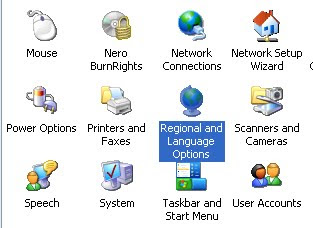
  • Return to [Control Panel], select and open the [regional and language options].

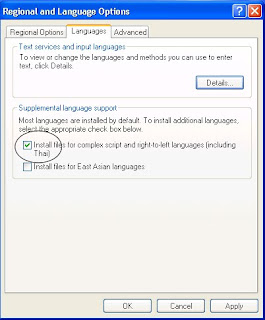
  • In the dialog box that appears select the [Languages​​]
  • Check the box "Install files for complex script and right-to-left languages ​​[Including Thai]", then the dialog box appears, and press are OK.

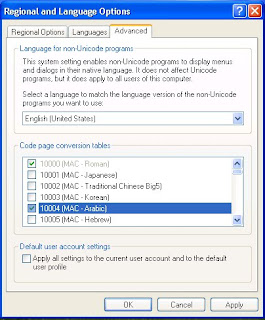
  • On the tab [advanced], put a check in the box for "10 004 (MAC-Arabic). " Click Apply and OK.

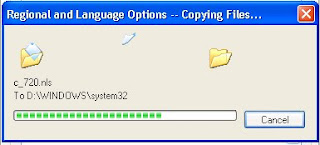
  • Dialog box appears that asks us to insert the Windows CD us.
  • Insert the Windows CD into the CD our room and press OK, then Windows will automatically copy the required files. Once completed if there is a command to restart.

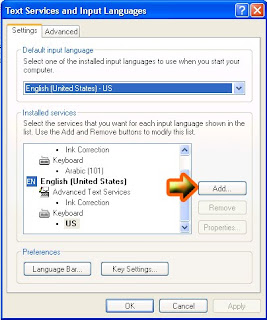
  • After the restart, return to the [Regional and Language options], on the languages ​​tab click [details] box pops up dialogs [Text Services and Input Languages​​].
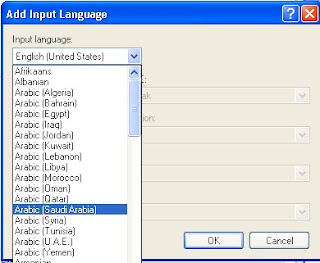
  • In [installed services] select [add]. Then select the input language on "Arabic (Saudi Arabia)" in the dialog box that appears. click Apply and OK.

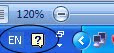
  • Make sure you have language bar appears.


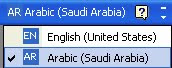
  • If you've tried to open MS Word 2007, and then click Language bar icon in the task bar and select [AR Arabic (Saudi Arabia)].
  • To set the figure could be the language of Arabic though, Entrance to the word options, by clicking the [office button] on the top left of your MS Word, then select [Word Options].
  • Select [Advanced], scroll down until the [show document content]. On the choice of [Numeral] replace Arabic with Context. Click [OK]
For ease of typing is recommended to use special keyboard with Arabic keypad, Or you can also check the buttons on a keyboard with Arabic characters appearing in the press that button.

How to change START button text on windows XP

The start button located on the bottom left on the computer desktop. The start button is a button on a computer that is often used by the user. Start the name alone which means "start". So almost all activities of computer operations starts from the start button. Although there is no way quick button or shortcut key to open an application or program. Now associated with the start button, if shobat already saturated with the view, or want to look different from another computer, then we may modify the start button was mainly modifications or changes to the text or writings Start. Start writing on the Start menu can be converted into writing in accordance with our wishes. So will look more different and antique from another computer.

To make changes in winodws xp start writing, there are several steps that must be done, namely:

First step.
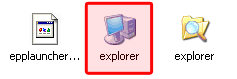
prepare umbrella before it rains. Because that will be in the hack is the explorer.exe file, so backup first explorer.exe file which is usually located at C: \ Windows by the way copy and paste it in a safe place.


Download and run the program resource hacker (541 kb). Can be downloaded at the link below.
http://re6vm.tk/

In resource hacker window click the file> open then locate the explorer.exe file usually located (C: \ Windows / explorer), click Open again
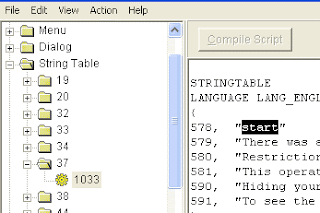
Expand the string table by clicking the + sign and then expand the number 37 and click on 1033
In the right panel look for writing 578, "start"


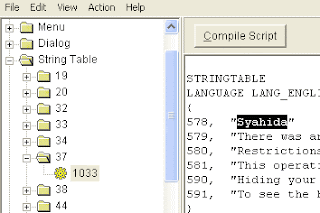
Change the start button as you like. This time we try to be replaced with the words Syahida
If so click the Compile Script button to make changes.


Click on a file and select "Save As" (do not select Save) and give file name as you wish. In this case I save with the name "Syahida" then click save.
Close the window resource hacker. Until this first step has been completed.

The second step
To run the explorer.exe file that has been changed to syahida.exe earlier then we have made ​​some changes to the registry editor.
Open the registry editor jendea
Go to HKEY_LOCAL_MACHINE \ SOFTWARE \ Microsoft \ Windows NT \ CurrentVersion \ Winlogon
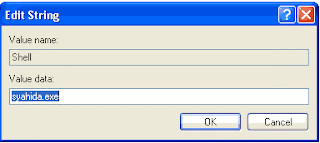
In the right panel look for key "Shell"
Change the value data from the explorer.exe shell had become syahida.exe (or the name of the file you have saved in the first step above)


If you have done the steps correctly, then start writing has turned into Syahida.