Sunday, May 15, 2011

Windows 7 in Archos 9 Tablet

Unlike the Apple iPad, Archos 9 is the choice for those who want a new digital experience touch screen technology and have the option to use it as a whole computer with a variety of additional equipment that can be taken anywhere.


Archos 9 Tablet PC uses Atom Z515 processor made ​​by Intel Corp. with a computing speed of 1.2 GHz and capable of operating for approximately five hours. Weighing less than 800 grams, the Archos 9 has a screen resolution of 1024 x 600 pixels and 60 GB hard disk capacity, and Bluetooth wireless connections, as well as two digital TV antenna DVB-T.

The touch-screen Archos 9 does not have the ability multisentuh as on a desktop computer products, such as TouchSmart 600 made ​​by Hewlett-Packard. That's because, one of the weaknesses of Windows 7 in introducing the touch-screen technology is not provided all the basic applications able to run this multisentuh activity.

Archos 9 Tablets are attractive and affordable option than Apple iPad. Having adequate memory capacity of 1 GB, Archos 9 is an alternative device than a netbook that would soon be abandoned manufacturers for various reasons. And Archos made ​​products is also able to display digital lifestyle becoming a trend nowadays.


Saturday, May 14, 2011

How to prevent other users changing the desktop background

For users, display wallpaper / desktop images is one thing that is of considerable concern. Desktop background or wallpaper images are unique and can make users more good fun dealing with computers. Each person as a computer user must have a sense of pleasure different desktop background on this. Lots of blogs or websites that provide links downloadable wallpapers or desktop background images to be unique-unique, so it will allow a user to change the desktop picture that she liked. But sometimes some users were even more pleased with the look that is minimalist without drawing altogether.

How to change the desktop background image or wallpaper are wont to do is to right click on desktop then select Properties. In the display properties window, select the desktop tab and then select one option or search the image that there is another picture on file with the click browse. Adjust the position and then click OK. So the wallpaper will change and have been replaced.

Desktop background that has been installed in accordance with the tastes and desires, in another time and opportunity could have been changed. Yes ...... wallpapernya changed since replaced by another user. Of course this is very annoying. To prevent other users changing the desktop background can be done by:

For users of Windows XP

  1. Press the window key + R (to open the run menu)
  2. Type gpedit.msc and press enter (to go to the windows group policy editor)
  3. Go to User Configuration> Administrative Templates> Control Panel> Display
  4. In the right pane, double click on Prevent changing wallpaper
  5. Change to enable
  6. Click OK
  7. Log off or restart the computer.
For users of Windows 7

  1. Press the window key + R (to open the run menu)
  2. Type gpedit.msc and press enter (to go to the windows group policy editor)
  3. Go to User Configuration> Administrative Templates> Control Panel> Personalization
  4. In the right pane, double-click on Prevent changing the desktop background
  5. Change to enable click OK
  6. It may take enable desktop wallpaper on the User Configuration> Administrative Templates> Desktop> Desktop
  7. Click OK
  8. Log off or restart the computer


After the above settings, the user can no longer to replace your desktop wallpaper or background. Desktop tab in display properties will become inactive, so it can not select images for desktop. They will think "Desktop background or wallpaper can not be replaced. "


How to backup and restore bookmarks in Mozilla Firefox

For those of you who loved to surf or browse the virtual world, most of you certainly make a bookmark to your blog or website due to his favorite blogs or websites that contain something about what is being sought or in accordance with the flair and passion. Whether it's about the tutorials or tips about computers, health, beauty, architecture, blogging, and so forth. By doing bookmarks, will allow a user to access or reopen website or blog without having to do a search on search engines like google, bing, or yahoo.

In certain events that cause the user must uninstall and reinstall the browser, then your blog or website that has dibookmark was also missing. Well ... that after re-install the browser, bookmark your blog or website can be recovered easily, then you should bookmark was backed up first. In the Mozilla Firefox browser bookmarks backups can follow the steps as below:
  1. Open the Mozilla Firefox browser, then click the Bookmarks menu
  2. Click the Organize Bookmarks
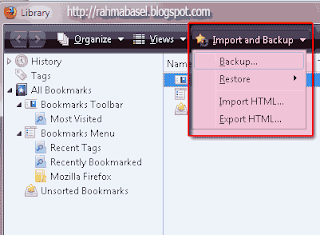
  3. In the Library window that appears, click Import and Backup menu
  4. Click backup
  5. Select the destination folder where you save the bookmark backup.
  6. Click Save.

To restore a backup or restore your bookmarks can be done by:
  1. Open the Mozilla Firefox browser, then click the Bookmarks menu
  2. Click the Organize Bookmarks
  3. In the Library window that appears, click Import and Backup menu
  4. Click restore and select choose file
  5. Select a bookmark backup file that you saved.
  6. Click open
  7. Appears replace bookmarks warning, click OK
  8. In this way, then bookmark your blog or website that has been stored can be raised again with ease, despite having to reinstall the browser.

For how to bookmark your blog or website can usually be done by pressing the Ctrl + D on your keyboard, or you can also double-click on the star in the address bar, as well as by drag and drop the bookmarks menu.

Monday, May 9, 2011

Hotspot Shield 1.57 Free Download

Currently very difficult to keep your privacy! Every Internet user, whether large or small sizes to try to track your movements. Some of them say that his actions are to serve relevant ads, without intent to harm you. Regardless of what they say, it is a wise action when you protect yourself from the efforts to spy on your movements on the internet.

KomputerTips.com already gives some the best free antivirus software to protect computers and files you from virus threats, malware, trojan and more! Antivirus is indeed good to keep your computer and identify trusted sites that you explore, and Hotspot Shield is one of the software is free and anonymous web surfing tool that deserves to be owned not only for protecting your privacy, but also as a security tool.

Hotspot Shield

Not enough to protect your computer from dangerous threats virus infection, you also have to secure your web session and personal and confidential information that you share with a trusted site! With so many people online today, then the trusted anonymous web surfing tool that keeps your privacy and security plays an important role. Hotspot Shield is one tool that offers protection that are relevant and are also available for free. Although this tool was originally intended to be used when surfing the web, public places like airports, railway stations, cafes, etc., but it is also important to use it on your computer at home.


Hotspot Shiled What to do?

Here's a web proxy tool is doing:

Securing a web session that you do, data, online shopping, and personal information online with the advanced data encryption technology (HTTPS)!
Protects you from identity theft.
Allows you to access all private content without any censorship, bypassing the firewall.
Protects you from snooper on a public computer kiosks such as wi-fi hotspots, hotels, airports, and other.

Download Free Hotspot Shield

After downloading the file (exe) above, double-click and then click "Download" to start downloading and installing Hotspot Shield via anchorfree download manager! During installation, make sure to remove the check mark to set the "Search" page as your home page and also make the search default gateway!

Hotspot Shield Free Download

Hotspot Shield offers protection for wired and wireless connections, this tool also works to create a virtual private network (VPN) between their computers and the Internet gateway. This tool works on Windows 7, Windows XP, and Vista computers also MAC.

Run Hotspot Shield and enjoy security when bersurfing internet.

Safe with Hotspot Shield

If you do not want to use this tool on each web session, you can decide through hotspot shield icon on the taskbar.

Hotspot Shield Free Download:
http://www.hotspot-shield.com/downloads/thank-you/?type=na&

The Differences between Windows 7 64-bit and 32-bit

Windows 7 is one of the operating system that is currently on the rise, many users who use it on your PC or laptop. But you know Windows 7 itself has 2 versions, namely Windows 7 32-bit and 64-bit Windows 7.

What's the Difference between Windows 7 x86 (32bit) - x64 (64bit)
Now we will discuss in detail about Windows 7 x86 (32bit) - x64 (64bit), so that we can all weigh when buying a new PC or laptop, whether to use Windows 7 x86 (32bit) or x64 (64bit).

Is it better to use Windows 7 64-bit or 32-bit Windows 7?

Windows 7 64-bit would be more effective when used by users who often works with large file sizes and require memory (RAM) which is also great, such as graphic design, gamers. Why? Because Windows 7 64-bit will give better performance compared to Windows 7 and a maximum of 32-bit. Windows 7 64-bit supports up to 193 GB memory upgrade, while Windows 7 32-bit only up to 3GB. In terms of security alone, Windows 7 64-bit safer to use because the drivers are 64-bit Windows 7 must have certification by the maker of hardware vendors, making it very difficult to be abused by parties who are not responsible.

PC or a computer such as what can use the Windows 7 64-bit?

In general computer on the market today can use the Windows 7 64-bit, but there also can not the computer that uses low-end processors such as Intel Atom or Intel Dual Core downward. Class processor Intel Dual Core to the top it certainly can run Windows 7 64-bit, but to make sure they could use the Intel Processor Identification Program to find out if your processor can run 64-bit Windows versions.

Other hardware such as LAN Card, Sound Card, VGA Card is also supported?
If the hardware business, can be seen in its construction. Hardware that is made after the introduction of Windows Vista it can support 64-bit Windows 7. Conversely, if the hardware is made before the birth of Windows Vista then you should look at the website vendor of hardware to see if there is a driver that supports Windows 7 64-bit.

Does Driver Windows 7 32-bit can be used on Windows 7 64-bit?

If you have questions like this, then the answer is definitely not. Windows 7 32-bit has a different structure with Windows 7 64-bit.

What is the solution if Windows 7 64-bit installed on your PC or laptop, while the dedicated hardware 32-bit Windows 7?
Windows 7 has a feature called Windows XP mode (Virtual Machine), with this mode then you can use the Windows driver 7 32-bit even if your computer has installed the Windows 7 64-bit.

Is Windows 32-bit programs can run on Windows 7 64-bit?

WOW Technology (Win 32 on Win 64) is the solution. So you can run the program Windows 7 32-bit on Windows 7 64-bit.

Will it be 32-bit Windows 7 is upgraded to Windows 7 64-bit?

Can. Wait for further discussion on this subject.

Friday, May 6, 2011

Download Adobe Creative Suite 5.5

Adobe has launched Creative Suite 5.5, the latest software packages for design and development. CS5.5 Pack trial version is available for download.

Adobe CS5.5 (gambar: music-only.net)
CS5.5 is a continuation of the software package Adobe Creative Suite 5, which was released in April 2010. CS5.5 has included updated versions of Photoshop, Illustrator, InDesign, Acrobat, Flash Builder Premium, Catalyst Flash, Flash Professional, Dreamweaver, Adobe Premiere Pro and After Effects. Similarly, as quoted by Mashable, Wednesday (04/05/2011).

Adobe CS5.5 software packages discussed so much because it features Flash and HTML5, and the ability to video production, editing her innovation and publication online. Party claims that Adobe CS5.5 is the best software package today for the design and development.

In addition, Adobe also focused on the mobile market. They positioned the Adobe AIR and Adobe Flash as an appropriate tool for designers and developers of mobile. In fact, Adobe claims that some online publishers have been using Adobe Creative Suite 5.5 for making online publication interesting and interactive for the tablets.

Curious to try the trial version Download Adobe Creative Suite 5.5? Click to: http://www.adobe.com/products/creativesuite.html

Google Earth Available For Android Tablet

Google Earth for the Android OS has been available since last year, but now the application has been made ​​specifically for the tablet based on Android.

Tampilan Google Earth untuk tablet Android
Parties Google announced that the update of Google Earth for Android tablets have added features such as 3D textured buildings, a tour of Street View, Action Bar for easier navigation and the ability to fly to a location, similar to how the desktop version of Google Earth.

"Google Earth Moving from smart phones to tablet is like moving from the ordinary into IMAX theaters. We take advantage of large screen sizes, including pop-up content that is on display Google Earth, allowing users to see more information without having to turn back a page , "wrote Google's side on their official blog. Similarly, as quoted by Mashable, Friday (6/5/2011).

Google Earth tablet version introduces a way to look around the 3D textured models of buildings, while showing a photo location that is being viewed.

Google Earth application for the tablet Android already available for download for free, whether it be through m.google.com / earth in the mobile browser or via the Android Market.